
Project Idea
My project aims to design and develop an Augmented Reality (AR) storybook titled “Space Adventure” that enhances children’s learning through immersive 3D storytelling. I want to combine traditional reading with digital interaction to create an experience that feels both educational and playful. The storybook is designed for children aged 6–10, encouraging them to explore the solar system and learn interesting facts about the planets in a fun and engaging way.
I chose this idea because I believe that learning should be exciting and imaginative, especially for young audiences. Augmented Reality (AR) offers the opportunity to merge visual, auditory, and hands-on learning in one experience, allowing children to interact directly with digital content in their physical environment. Research shows that AR can improve motivation, engagement, and memory retention by combining interactive learning with real-world context (Billinghurst and Duenser, 2012). This inspired me to explore how I could apply AR in an educational storytelling format that encourages curiosity and creativity.
In my storybook, printed pages will come to life when scanned with a mobile device or tablet. Each page will feature a different planet, such as Mars, Jupiter, Mercury, or Venus. When scanned, a 3D model of the planet will appear above the book, rotating with realistic textures and colours. Children can tap on interactive buttons to listen to short facts or voice narration about each planet. My goal is to make the experience intuitive and enjoyable while supporting early learning through visual and interactive engagement.
The purpose of my project is to make learning about the planets fun, interactive, and accessible through play-based discovery. I aim to transform a traditional storybook into a digital learning tool that promotes imagination, engagement, and understanding of science through storytelling.
To achieve this, I will follow a design thinking process, including research, ideation, prototyping, and testing. I will design my image targets in Adobe Illustrator, create 3D planet models in Blender, and develop the full AR experience in Unity using Vuforia. I also plan to conduct user testing with children to evaluate usability, engagement, and learning outcomes.
Scope of the Research Project
This research project explores the design and development of a space-themed Augmented Reality (AR) storybook titled “Space Adventure,” created to enhance learning and engagement among children aged 6–10. The study focuses on how AR technology, when combined with storytelling, can transform traditional reading into an interactive and educational experience. The project will examine how 3D visualisation, sound, and interactive elements can support children’s understanding of space concepts, such as planets, orbits, and exploration, in a fun and accessible way.
The research will involve story design, user experience (UX) development, 3D modelling, and AR integration to build a functional prototype that demonstrates immersive learning. User testing will be conducted with children, under parental supervision, to evaluate engagement, usability, and educational impact.
Image Targets in Augmented Reality
An image target is a flat image or graphic that acts as a visual marker for triggering augmented reality (AR) content. When users point their smartphone or tablet camera at the image, the AR software recognises the visual pattern and overlays 3D models, animations, or interactive elements on top of it in real time. This allows digital content to appear as if it exists physically on the page, blending storytelling with interactive technology.
In the “Space Adventure” storybook, each page will feature a unique image target designed in Adobe Illustrator and optimised using Vuforia’s image target configuration. When a child scans a page, planets, stars, and interactive buttons will appear, allowing them to explore and learn about space as if they were part of the story. Through their device’s camera, children will see the printed page transform into a living scene, where they can tap and explore various elements.
AR portals and image-based interactions allow users to step into virtual worlds through the lens of their device, combining real-world and digital environments in a single immersive experience. This technique has been used across industries such as education, tourism, and retail to merge imagination with information, enhancing engagement and interaction. In an educational context, image targets create a sense of presence and participation, helping children visualise complex ideas in a fun and accessible way.
By using this approach, the “Space Adventure” storybook transforms traditional reading into an interactive learning experience, encouraging curiosity, creativity, and exploration through AR technology.
User experience (UX) and Ethical Considerations
When designing the “Space Adventure” AR storybook, several technical, user experience, and ethical factors must be considered to ensure accessibility, inclusivity, and safety for young users.
- Device Compatibility: The AR storybook will be designed for both iOS and Android devices, supporting iOS 11 and Android 7.0 or later. Testing across different models will help ensure stable performance and accessibility for users with older devices.
- Accessibility and UDL Principles: The design will follow Universal Design for Learning (UDL) principles (Rose, Gravel and Gordon, 2013) to make the experience suitable for all children. This includes audio narration, subtitles, dyslexia-friendly fonts, and high-contrast colours to support diverse learning needs and visual abilities.
- User Comfort and Visual Guidance: AR scenes will be simple and calming to avoid overstimulation. Clear visual cues, such as arrows or button prompts, will guide users through interactions while maintaining a sense of independence and play.
- Ethical Practice: All user testing will require parental consent and supervision. The experience will operate offline, collect no personal data, and comply with GDPR-K and COPPA regulations (Livingstone, 2018). Content will remain age-appropriate, avoiding fear or violence, and a short disclaimer will inform users they can pause or exit at any time for comfort.
Content Development
There are several key components involved in developing my “Space Adventure” AR storybook, and I will need to use a range of software to produce the final interactive experience.
Firstly, I will design and build 3D models and environments that visually represent space scenes such as planets, stars, and orbits. To do this, I plan to use Blender for creating and texturing 3D assets. Blender will allow me to model planets with realistic surfaces and design interactive buttons and icons that children can tap within the storybook. Creating these models myself will ensure originality and consistency in the visual style of the project.
Once the 3D elements are created, I will import them into Unity, where I will set up the Augmented Reality (AR) functionality using the Vuforia plugin. Unity will serve as the main platform for building AR interactions and designing how digital elements appear when the storybook pages are scanned. I will also create image targets in Adobe Illustrator, ensuring that each target meets the Vuforia Image Target configuration requirements for recognition and performance. Additionally, I plan to follow several tutorials on Unity, AR setup, and Vuforia configuration to strengthen my technical understanding during production.
Finally, I will bring all of these elements together within Unity to create a smooth, interactive AR experience. Each printed page of the storybook will act as a trigger for a different AR scene, and children will be able to tap on interactive buttons to reveal information, animations, and visual effects that reinforce both learning and enjoyment.
User-Centred Design
To design an effective and engaging AR storybook, it is essential to understand the needs and expectations of the people who will use it. The “Space Adventure” project is aimed at children aged 6–10, along with parents and teachers who help guide their learning experience. By considering different perspectives, I can ensure the final product is both educational and enjoyable, while also being safe and age-appropriate.
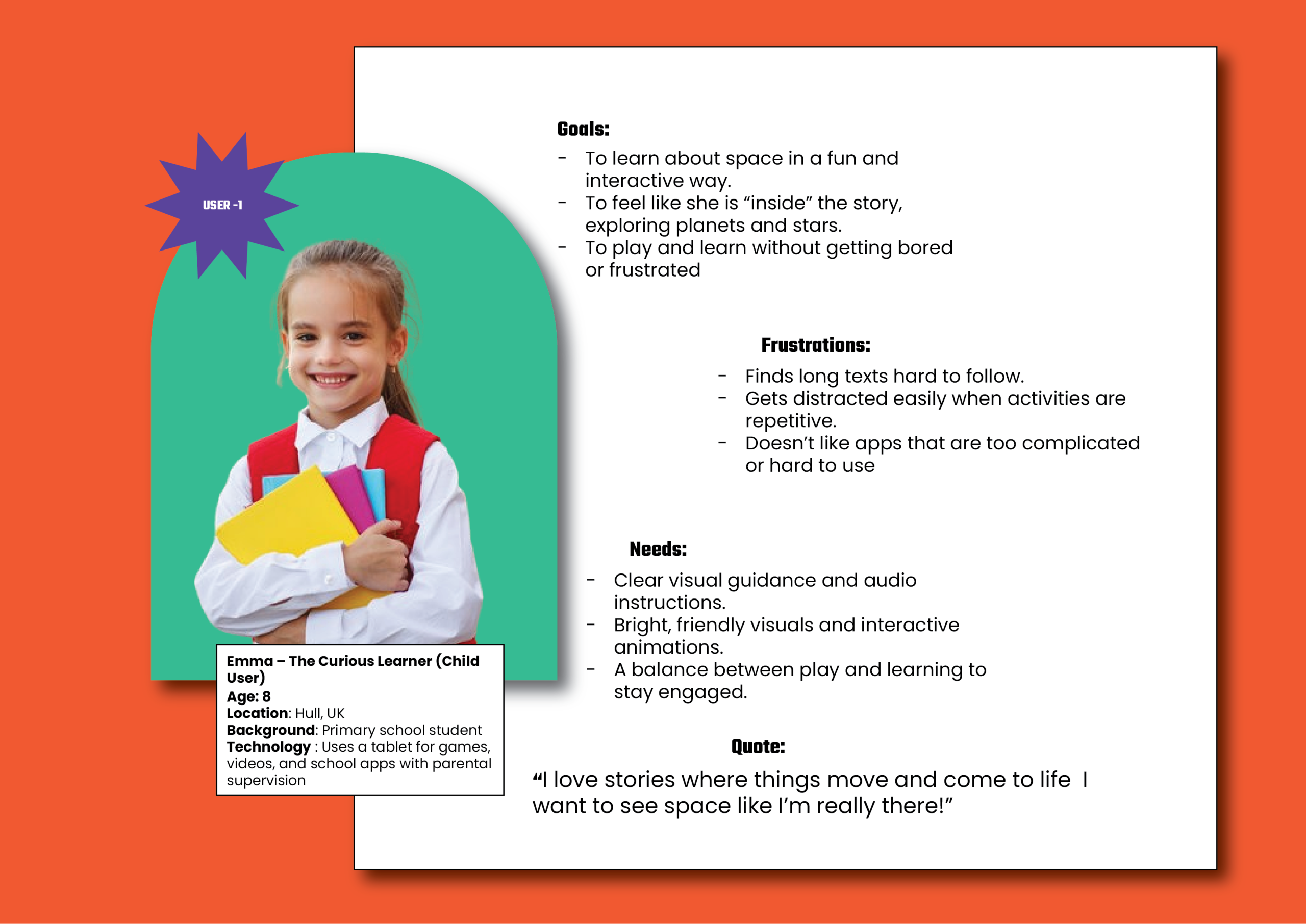
User Perspective (Child User)
“I am a child who loves reading and exploring new things. I find space exciting and want to learn more about planets and stars in a fun, interactive way rather than just reading from a normal book.”
User Research Perspective:
Children learn best through visual and hands-on activities. They are naturally curious, enjoy games and challenges, and engage more deeply when learning feels playful. The AR storybook should encourage discovery and interaction while maintaining simplicity and clarity in its design.
Four W’s:
Who: Children aged 6–10.
What: Want to learn about space through play and storytelling.
Where: At home or in a classroom environment.
Why: To make learning fun, interactive, and memorable.
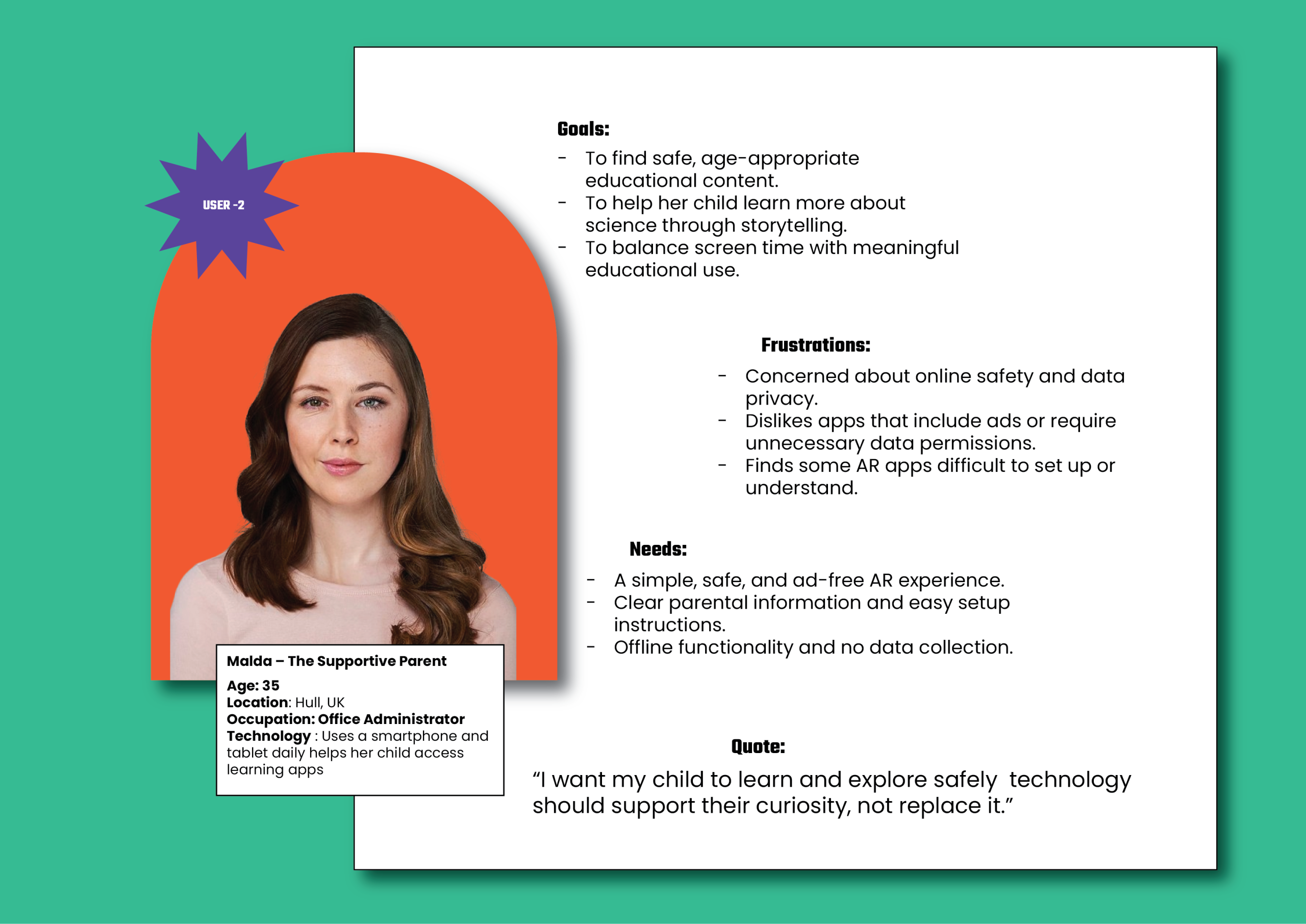
User Perspective (Parent/Guardian)
“I am a parent who wants my child to learn while having fun. I like the idea of technology being used for education, but I also want it to be safe and easy for my child to use.”
User Research Perspective:
Parents are looking for safe, educational, and screen-conscious experiences that encourage curiosity without overexposure to technology. They appreciate apps that are easy to set up, don’t collect data, and allow for shared learning moments with their children.
Four W’s:
Who: Parents or guardians of children aged 6–10.
What: Want safe and educational interactive learning tools.
Where: At home, during learning or playtime.
Why: To support their child’s education while limiting excessive screen time.
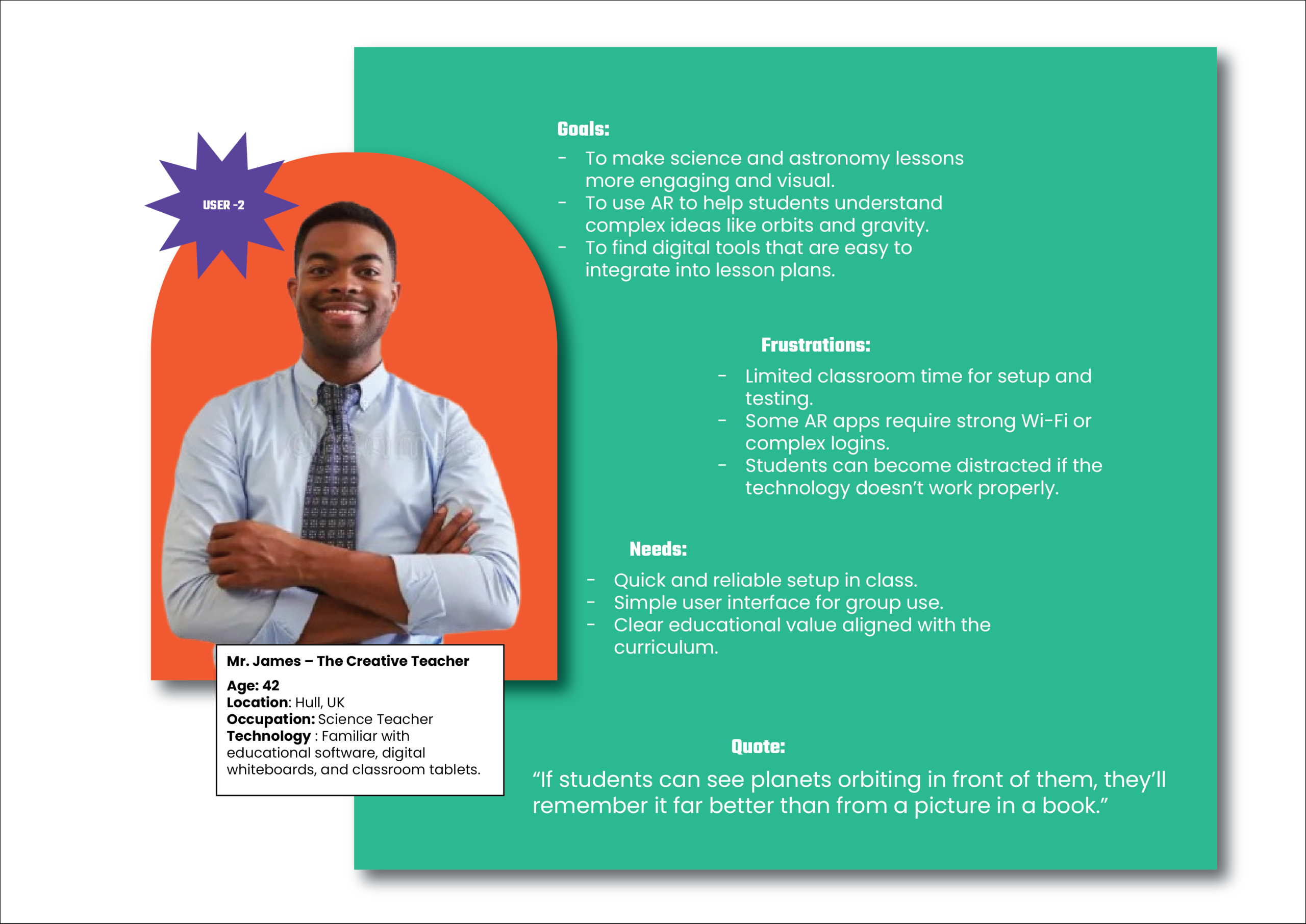
User Perspective (Teacher/Educator)
“I am a teacher who wants to make science lessons more exciting. I would like to use creative tools that help my students visualise and understand topics like space in a way that textbooks can’t.”
User Research Perspective:
Teachers seek innovative and curriculum-aligned tools to make abstract concepts more tangible. AR storybooks can help visualise lessons, spark classroom discussions, and motivate students to learn through exploration. The experience should be simple to operate, quick to set up, and enhance traditional teaching materials rather than replace them.
Four W’s:
Who: Primary school teachers.
What: Want engaging teaching aids that integrate storytelling and science.
Where: In the classroom, during lessons or group activities.
Why: To make learning interactive and to maintain students’ attention and interest.
By understanding the needs of children, parents, and teachers, the “Space Adventure” AR storybook can be designed to balance education, entertainment, and ethical responsibility. This user-centred approach ensures that the final product supports active learning, creativity, and safe interaction with emerging technologies
To better understand my users and their needs within the Space Adventure AR storybook, I created three user personas: a child learner, a supportive parent, and a creative teacher. These personas outline goals, frustrations, and expectations, helping me design an engaging and inclusive experience. From a user perspective, they show how different audiences interact with AR, while from a research perspective, they guide design choices around accessibility, safety, and educational value. Together, they ensure the project remains user-centred, combining fun, learning, and simplicity
Project Workflow and Methodology Overview
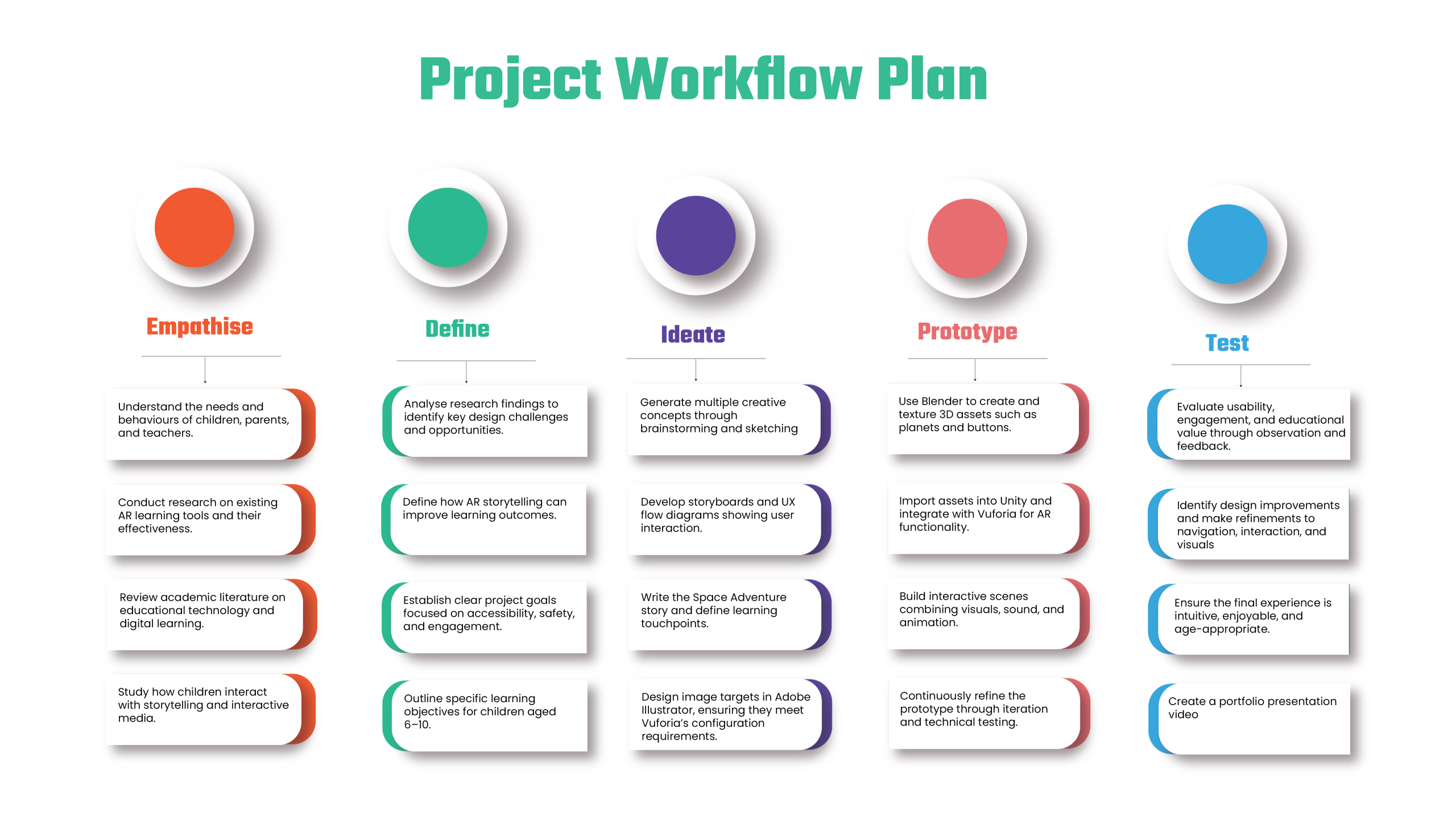
The “Space Adventure” AR storybook project adopts a Design Thinking methodology, supported by Agile/Scrum principles, to ensure the design process remains user-centred, iterative, and research-driven. This methodology aligns closely with the workflow visualised above, guiding each stage of development from research and concept creation to prototyping and user testing in a structured yet flexible manner.
The process begins with the Empathise stage, where research focuses on understanding the behaviours and learning needs of children aged 6–10, as well as the expectations of parents and teachers. Insights gathered from this research are then refined in the Define stage, where key design challenges are identified such as ensuring accessibility, maintaining engagement, and aligning AR content with educational goals.
During the Ideate phase, creative exploration takes place through story development, sketching, and UX planning. The Space Adventure narrative, characters, and interactions are conceptualised, while image targets are designed in Adobe Illustrator to meet Vuforia’s configuration requirements for AR recognition.
The Prototype phase brings the visual and interactive elements to life using Blender and Unity, integrating 3D models, sound, and animations into an immersive AR experience. Agile principles are applied here through short iterative “sprints,” where prototypes are regularly tested and refined for usability and performance.
Finally, in the Test phase, the prototype is evaluated with children under parental supervision. Feedback on engagement, clarity, and usability is collected to guide further improvements. This ensures the final storybook experience is intuitive, educational, and enjoyable, balancing creativity with learning outcomes.
Together, this Design Thinking and Agile approach ensures that the Space Adventure project remains both human-focused and technically adaptive, allowing for continuous refinement and innovation throughout the development process.
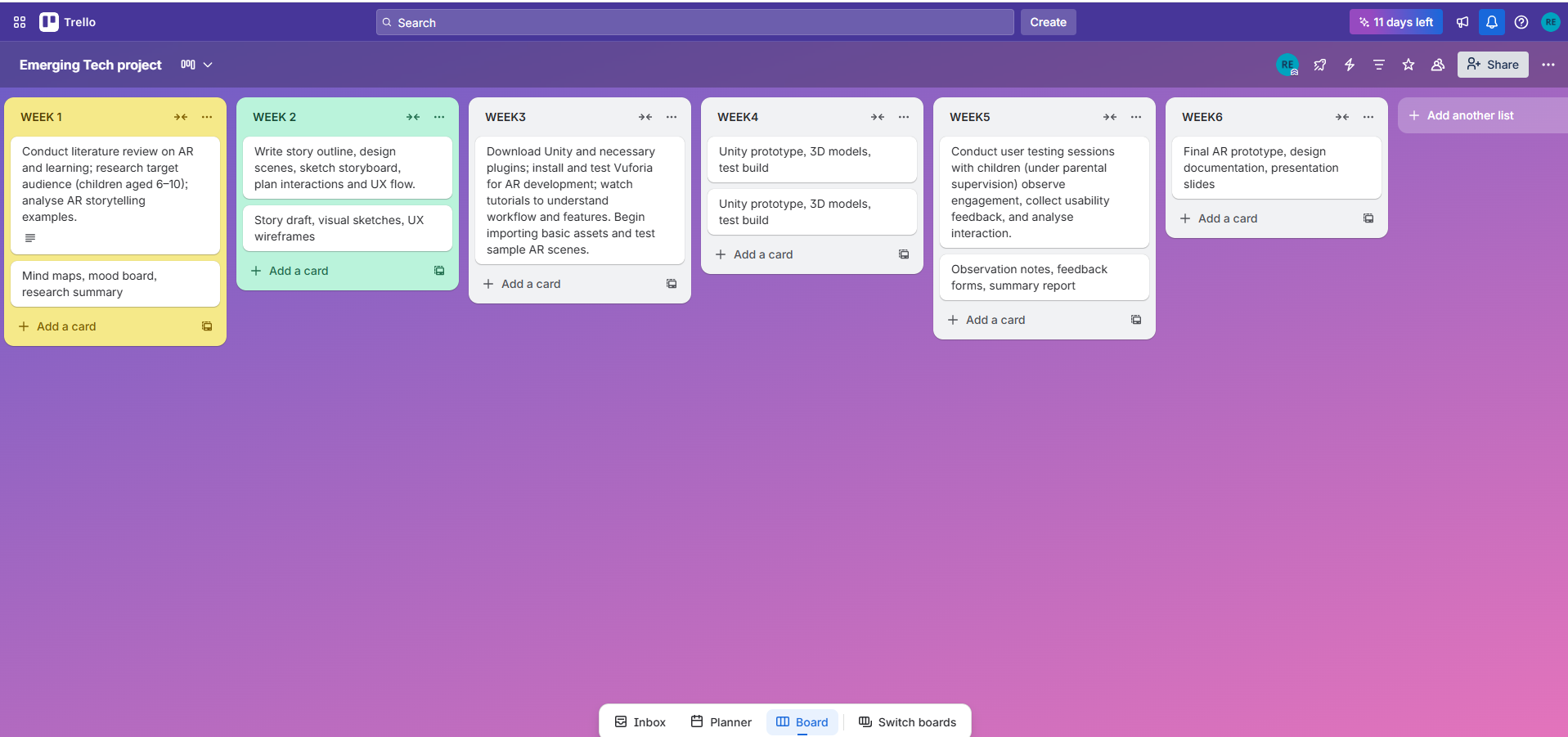
To help manage my workflow effectively, I created a Trello board that organizes each stage of my project into weekly milestones. This visual planning tool allows me to clearly see what needs to be completed each week, track my progress, and set achievable deadlines. By breaking the project down into smaller, structured tasks such as research, prototyping, testing, and refinement I can stay focused and maintain steady progress. Trello also helps me prioritize tasks, reflect on completed work, and adapt my schedule when necessary, ensuring that the overall project stays on track and meets its goals efficiently.
Storyboard Concept – Space Adventure AR Storybook
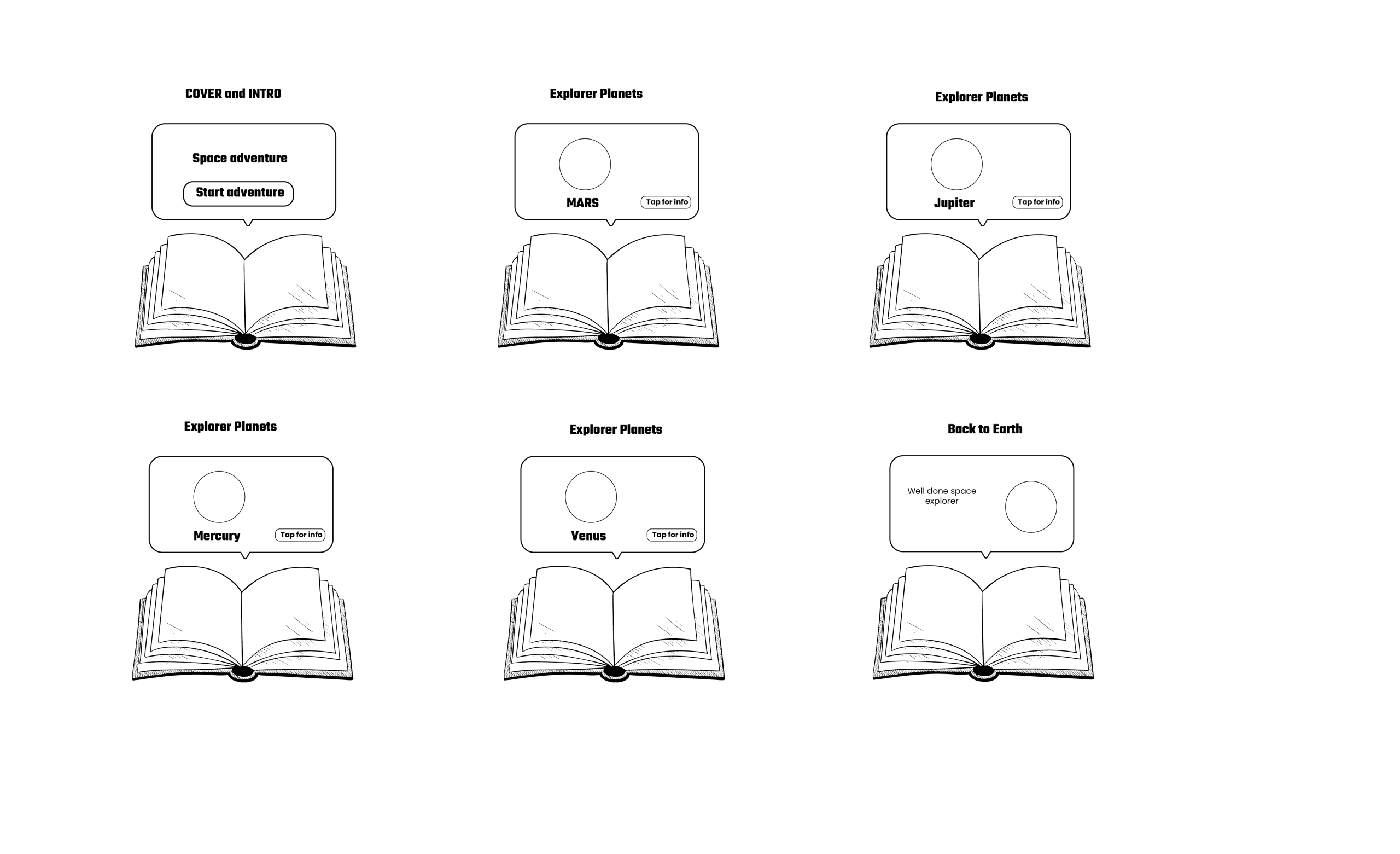
The storyboard visually represents the user journey and interactive flow of the “Space Adventure” AR storybook. It illustrates how printed storybook pages transform into dynamic 3D learning environments when viewed through an augmented reality (AR) application on a tablet or smartphone. Each stage of the storyboard focuses on a key part of the learning experience from introduction to exploration and reflection, guiding children through an engaging, educational, and user-friendly digital journey.
The first scene represents the Cover and Introduction page. When scanned, the book’s front cover triggers an AR animation featuring the project’s title, “Space Adventure,” along with a clear “Start Adventure” button. This screen serves as an entry point for young users, introducing them to the theme of space exploration and setting a tone of curiosity and excitement. The use of simple interface elements and clear typography ensures accessibility for children aged 6–10, while the animated visuals help establish a sense of immersion from the very beginning.
The second to fifth scenes represent the main exploration phase of the storybook, where children learn about different planets in our solar system, including Mars, Jupiter, Mercury, and Venus. Each page acts as an image target that, when scanned, displays a 3D model of the featured planet hovering above the physical book. Accompanying buttons such as “Tap for Info” allow users to interact directly with the planets, triggering pop-up facts, short animations, or voice-over narrations explaining key characteristics such as size, colour, orbit, and surface features. This interaction combines visual, auditory, and kinaesthetic learning, making it suitable for various learning styles. The consistency of the interface across all planet scenes ensures that users can navigate the experience intuitively, reinforcing memory through repetition and exploration.
The final scene, Back to Earth, concludes the journey with a celebratory message, “Well done, Space Explorer!” alongside a 3D model of Earth. This moment provides a sense of accomplishment and closure while reinforcing the educational content learned throughout the experience. The reward-style feedback encourages motivation, replayability, and continued curiosity about space and science.
Overall, the storyboard demonstrates how “Space Adventure” blends storytelling, interactivity, and education within an accessible and enjoyable AR framework. Each scene is carefully designed to maintain engagement, promote learning through discovery, and align with ethical and age-appropriate design principles. The layout supports user-centred design, ensuring that the experience is intuitive for children, reassuring for parents, and adaptable for educational settings. By transforming a traditional storybook into an interactive digital journey, this storyboard embodies the project’s goal: to enhance children’s learning through immersive 3D storytelling that sparks imagination and understanding.
References list
Billinghurst, M. and Duenser, A. (2012) ‘Augmented reality in the classroom’, Computer, 45(7), pp. 56–63.
Livingstone, S. (2018) Children: data and privacy online – growing up in a digital age. London: London School of Economics and Political Science.
Rose, D.H., Gravel, J.W. and Gordon, D. (2013) Universal design for learning: theory and practice. Wakefield, MA: CAST Professional Publishing.